www.cineviewprojects.com
Price: $3,000 At A Glance: Superior 2D color and adjustability • Crisp resolution • Outstanding value
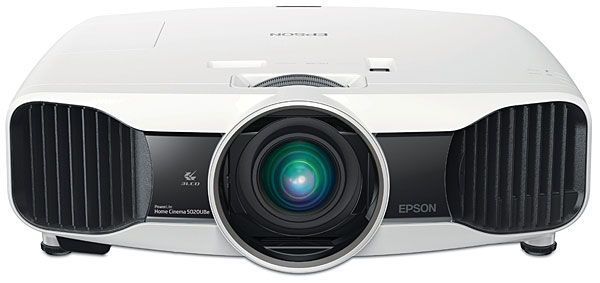
Epson is one of the world’s most prolific projector manufacturers, serving both the business and home markets. The company’s current flagship home theater model, the PowerLite Pro Cinema 6020UB, sells for $4,000. But for $2,700, you can buy the PowerLite Home Cinema 5020UB. The latter omits the spare lamp, ceiling mount, additional warranty year, and all-black case that come standard with the 6020UB.
But the two projectors are otherwise all but identical. While we have not tested the 6020UB, the specs suggest that the two models offer the same performance but are simply sold through two different distribution channels. In addition, you can opt for a feature on the 5020UB that’s not available on the 6020UB: RF wireless HDMI. With that capability, the 5020UB becomes the 5020UBe, the featured attraction in this report.
The PowerLite Home Cinema 5020UBe’s sleek and functional chassis is of average size for a home projector. The lens shift, focus, and zoom are all manual, offering throw distances ranging from 9.8 to 20.9 feet with a 100-inch (diagonal) 16:9 screen. Some of the competition now offers powered lens adjustments, but the Epson’s manual controls have a smooth, quality feel for fast, precise operation. One downside, however, is that the projector lacks a stretch mode for those who might want to add an anamorphic lens, either now or later.
The Epson offers a number of different picture modes, which it calls Color Modes. The projector is THX certified, so two of those modes carry the THX seal of approval—one for 2D and another for 3D.
The optical path is well sealed, with no significant stray light leaking from the case. There are two different lamp settings in the Power Consumption menu: Eco (low—not available in 3D) and Normal (high). In the Eco mode, the fan is nearly silent; in Normal, it’s audible but not intrusive. The claimed lamp life is 5,000 hours in Eco—an unusually high figure (such specs are generally to half brightness, and there’s no guarantee that a lamp won’t fail earlier). The projector also has a selectable Auto Iris that works flawlessly and offers significantly deeper blacks. I used it in all of my tests and viewing. There is no manual iris.
The color adjustments include Absolute Color Temperature with discrete settings at 500K steps, plus a separate RGB menu with high (gain) and low (offset) white balance controls. There’s also a full color management system (CMS) in the RGBCMY menu. Like most of the projector’s controls, both RGB and RGBCMY are separately adjustable for each color mode, for each input, and for SD and HD resolutions.
A gamma control provides several fixed settings, plus a customized option adjustable at nine steps across the brightness range. The sharpness menu offers either standard or advanced settings, the latter providing separate enhancement for horizontal and vertical resolution and for thick and thin lines. I found these sharpness adjustments, and sometimes the separate Super-resolution control, surprisingly useful when used with care. The advanced sharpness and Super-resolution controls are not available in 3D.
The Epson also offers motionsmoothing frame interpolation. It worked as well as any such smoothing we’ve seen, but apart from briefly checking it, I didn’t use it. Frame interpolation can be useful for video-based material, like sports, but for me, it gives film-original sources a too-slick, creepy, soap-opera look. The projector’s refresh rate, depending on the source, is either 192 hertz or 240 Hz in 2D and 400 Hz or 480 Hz in 3D.
The 5020UBe provides 10 memories in which you can store multiple setups, and you can name each individually. Considering the wide range of possible control combinations, this is a useful feature. I managed to fill up all the memories during my calibration, but that was largely due to OCCD—obsessive-compulsive calibration disorder. The memories allowed me to go back to previous trials for a quick comparison to make sure things were actually getting better.

A split-screen feature (not available in 3D) lets you view two images side by side, with some limitations on the available combinations. For example, you cannot simultaneously display images from two digital inputs, such as HDMI1 and HDMI2.
There’s also an LCD Alignment feature for fine-tuning the horizontal and vertical convergence of the pixels, even at multiple zones around the screen. This proved critical for getting the best out of the projector.
Epson’s wireless transmitter has four HDMI inputs and two outputs, HDMI and TosLink optical. The latter are for feeding the source audio to your AVR or surround pre/pro.
The 3D adjustments include the usual suspects: 3D Format, Depth, and Brightness (I chose High for all of my 3D tests), diagonal screen size, and a control to turn off an annoying 3D viewing notice that otherwise pops up whenever the projector senses a 3D source. There’s also a 2D-to-3D conversion mode that works as well as most, which is to say it’s modestly effective but can’t replicate the real thing.
Epson’s active 3D glasses are rechargeable, and two pair are included with the projector. Extras cost $99 each, but there are cheaper alternatives. A set of Samsung’s battery-powered (non-rechargeable) SSG03050GB ($30) worked fine. The newer Samsung SSG-4100GB (under $19 on Amazon) should also work, but I didn’t have a pair on hand to confirm.
On Screen: 2D
The Epson sailed through all of our deinterlacing and scaling tests, both standard and high definition, with the exception of SD and HD 2:2 pulldown (commonly found on video-based rather than film-based material). Many displays have had trouble passing our 2:2 tests. There was also a rolloff in the highest frequency burst of our chroma resolution test, but it was not significant enough to deny a passing grade.
Of course, you won’t likely go to that extreme except perhaps at next year’s Super Bowl party. In the more sensible THX color mode, with a totally darkened room, the auto iris in Normal, and the lamp on Eco, I had to turn the contrast control to –10 to reduce the brightness to 21 ft-L on the same screen.
The convergence of the Epson’s red, green, and blue picture elements was mediocre out of the box. Even at center screen, there was nearly a full pixel of horizontal and vertical error in both red and blue. While the deviation wasn’t clearly visible from a normal viewing distance, the images were just a hair shy of fully satisfying sharpness. After I attacked the projector’s LCD alignment controls, the picture was clearly improved. It wasn’t a night-and-day difference, but the effort put into a color alignment moved the projector’s resolution into easy parity with the best of its competition. Yes, some experts argue that electronic manipulation of convergence (all such convergence controls are electronic) can affect resolution. They are probably correct, but the benefits achieved here outweighed any possible theoretical losses.
The Epson’s blacks weren’t quite as compelling as the best I’ve seen from projectors costing at least $1,000 more, but they were still impressive. The first act of The Avengers is loaded with dark scenes: Loki plotting with his alien conspirators, the main operations center at the Dark Energy headquarters (a mix of dark backgrounds set off against bright highlights), the night car chase as the headquarters are destroyed (low internal contrast and few bright highlights), the interrogation of Natasha/Black Widow in a Russian warehouse, and Black Widow finding and recruiting Bruce Banner/the Hulk to the Avenger team. A few of these difficult images looked slightly grayish here and there but were nevertheless largely impressive and satisfyingly rich.
The Epson also made the most of brighter material with its colorful, punchy picture. Titanic looked gorgeous in its new 2D Blu-ray transfer, with natural detail and near perfect color, including natural fleshtones. The drop-dead color and resolution on Kung Fu Panda 2 looked even more breathtaking. This is the most detailed computer-animated feature I know of, and from its lightest to darkest scenes, the Epson was jaw dropping.
The HDMI RF wireless feature was something of a mixed bag. It locked on even when the transmitter was positioned nearly 90 degrees to the side of the projector (the projector’s built-in receiver is located on the front), though it’s not specified to work through walls (which I didn’t test). At first, I saw nothing obviously wrong in wireless mode—the same solid black levels, the same superb resolution and color, and no video artifacts. But the picture seemed to lack a little punch compared with the wired connection. When I re-checked the calibration, comparing wired versus wireless with the same picture settings, the readings were similar at most points. But at 40 percent brightness, the wired gamma was 2.24 and the wireless 2.72! This was so odd that I repeated it again, with the same result. A clever calibrator might be able to correct this with the projector’s custom gamma feature, but it could be tricky to do without degrading the results at other points: The gamma at 30 percent and 50 percent, both wired and wireless, was virtually the same at around 2.14. I recommend using a wired connection if at all possible. And if you can live without the wireless feature altogether, the wired-only model will save you $300. (At press time, Epson, upon learning of my findings, declared it unusual and vowed to look into the issue.)
On Screen: 3D
I ultimately ended up using the 3D Dynamic mode for my 3D watching, a decision I arrived at after considerable testing and agonizing. I managed a decent calibration in the THX 3D mode, but it wasn’t bright enough for prime-time 3D—at least not for me on a 1.3-gain screen. The lack of image pop was particularly evident on dark films like Prometheus.

Courtesy- Cineview Projects
www.cineviewprojects.com

